


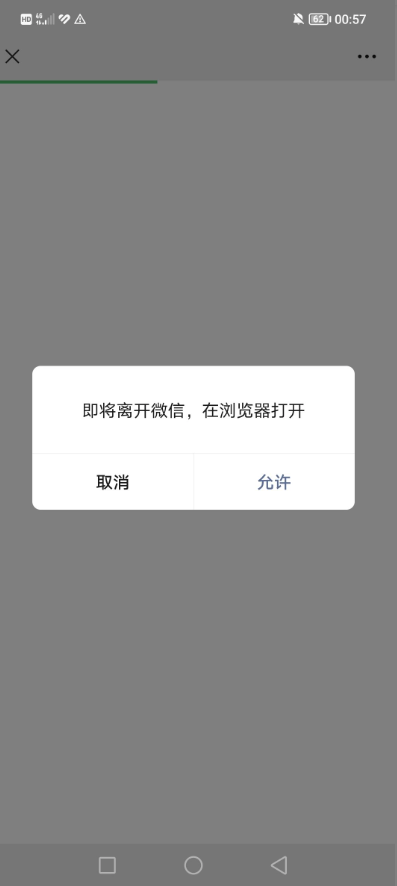
可以直接拉起微信浏览器跳转到外部的浏览器,原理是模拟下载文件拉起外部浏览器跳转,这个方式只测试过PC和安卓手机可以用,IOS测试不行!
<?php
$ua =$_SERVER['HTTP_USER_AGENT'];
$isWechat = (strpos($ua, 'MicroMessenger')) ? true : false;
if ($isWechat) {
    header("Content-Disposition: attachment; filename=\"a.doc\"");
    header("Content-Type: application/vnd.ms-word; charset=utf-8");
} else {
    header('location: http://yourdomain');
}
?>
<!DOCTYPE html>

<html lang="zh">
<head>
<meta charset="UTF-8">
<meta name="viewport" content="width=device-width, initial-scale=1.0">
<title>浏览器打开</title>
<style>
  body {
    font-family: 'Arial', sans-serif;
    background-color: #f7f7f7;
    text-align: center;
    padding-top: 50px;
  }

  .container {
    margin: 0 auto;
    width: 90%;
    max-width: 600px;
    background-color: #fff;
    padding: 20px;
    box-shadow: 0 0 10px rgba(0, 0, 0, 0.1);
    border-radius: 8px;
  }

  button {
    background-color: #007bff;
    color: white;
    padding: 10px 20px;
    font-size: 18px;
    border: none;
    border-radius: 5px;
    cursor: pointer;
    margin-top: 20px;
  }

  button:hover {
    background-color: #0056b3;
  }

  .instructions {
    margin-top: 20px;
    font-size: 16px;
    color: #666;
  }
</style>

<script>
function openInBrowser() {
  var targetUrl = 'http://yourdomain'; // 替换为您想要跳转的网址

  // 检测是否在微信浏览器中
  var ua = navigator.userAgent.toLowerCase();
  if (ua.match(/MicroMessenger/i) == 'micromessenger') {
    // 在微信内,显示提示信息
    alert('请点击右上角菜单,选择"在浏览器中打开"');
  } else {
    // 不在微信内,直接跳转
    window.location.href = targetUrl;
  }
}
</script>
</head>
<body>

<div class="container">
  <h1>Gcn · 博客</h1>
  <p>为了更好浏览体验,请通过右上角从浏览器打开</p>
  <div class="instructions">
    <p>如果您在微信中打开此页面,请:</p>
    <ol>
      <li>点击页面右上角的三个点</li>
      <li>选择“在浏览器中打开”</li>
      <li><button onclick="openInBrowser()">打开网站</button></li>
    </ol>
  </div>
</div>
</body>
</html>
方式二:Android微信内h5页面唤起浏览器打开页面的技术分析和实现
众所周知,微信是有内置浏览器的,方便浏览网页。但是其内核也是经过特殊改造,导致一些默认行为无法触发。为了实现从微信跳转到浏览器打开页面,可以说是相当的困难,本次分享的是Android系统的微信在h5页面调起手机浏览器并打开指定页面的方法。
技术原理
通过二进制文件下载的方法,调起本地浏览器下载文件实现唤起浏览器。
代码
使用php的头文件实现文件下载,告诉浏览器这是一个二进制文件流,浏览器就会唤起下载,那么在Android唤起下载都是调起浏览器的。
调起浏览器之后,跳转到浏览器,就会在浏览器判断当前的UA,如果不是在微信环境下,那么就无需再次调起下载,而是重定向Url,就实现了跳转到指定的页面了。
<?php

    // 文件路径
    $file = 'jump.doc';

    // 检查用户代理字符串是否包含 MicroMessenger
    $isWeChat = strpos($_SERVER['HTTP_USER_AGENT'], 'MicroMessenger') !== false;

    if ($isWeChat) {

        // 如果是微信浏览器,则直接下载文件
        header('Content-Description: File Transfer');
        header('Content-Type: application/octet-stream');
        header('Content-Disposition: attachment; filename="'.basename($file).'"');
        header('Expires: 0');
        header('Cache-Control: must-revalidate');
        header('Pragma: public');
        header('Content-Length: ' . filesize($file));
        readfile($file);
        exit;
    } else {


        // 如果不是微信浏览器
        // 则使用js重定向
        echo '<script>location.href="https://ulink.alipay.com/?scheme=alipays%3A%2F%2Fplatformapi%2Fstartapp%3FsaId%3D10000007%26clientVersion%3D3.7.0.0718%26qrcode%3Dhttps%253A%252F%252Frender.alipay.com%252Fp%252Fc%252Falipay-red-qrcode%252Fshared.html%253Fchannel%253Dsearch_pwd%2526shareId%253D2088602294611742%2526token%253D196139496tmg2vcinfrii8chMb%2526campStr%253DkPPFvOxaCL3f85TiKss2wsBZgIjulHjG%2526sign%253DqsiVOoa7TuphryWxyBdONXsMTnE3jiIBvWeUs3yV1sw%253D%2526chInfo%253DDingtalk%2526c_stype%253Dsearch_pwd";</script>';
    }
?>
评论 (0)