
搜索到
71
篇与
的结果
-
 用微信hook的消息id获取图片视频语音 在文件传输助手里面可以访问原文件,首先登录微信文件传输助手: https://szfilehelper.weixin.qq.com/ 获得到cookie,只要下面三个参数就行了(其它的随意)webwx_data_ticket=随便写wxuin=1111111;wxsid=22222222; webwx_data_ticket=333333; 然后访问链接地址可以得到原文件:获取消息中的图片: https://szfilehelper.weixin.qq.c ... msgimg??&MsgID=消息id(纯数字的那个)&mmweb_appid=wx_webfilehelper 获取消息中的视频: https://szfilehelper.weixin.qq.c ... tvideo??&MsgID=消息id(纯数字的那个)&mmweb_appid=wx_webfilehelper 获取消息中的语音: https://szfilehelper.weixin.qq.c ... tvoice??&MsgID=消息id(纯数字的那个)&mmweb_appid=wx_webfilehelper
 -
防盗链三部曲 流量计费的CDN,轻量云服务器,为避免被pcdn清洗,可以尝试以下三部曲,以下方法对图片与附件均有效果,还可以增加token 验证方式设置链接阅后即焚、时效期更加安全;虽不能完全避免但是大几率减少被刷风险!1.检测来访源,设置站点白名<?php $allowedHosts = ['www.tiansj.net', 'tiansj.net']; if (!isset($_SERVER['HTTP_REFERER']) || !in_array(parse_url($_SERVER['HTTP_REFERER'], PHP_URL_HOST), $allowedHosts)) { header('HTTP/1.0 403 Forbidden'); exit('来源不合法禁止访问,Access forbidden'); } ?>2.开启跨域访问验证<?php header('Access-Control-Allow-Origin: https://www.tiansj.net'); // 仅允许特定域访问 ?>3.检测HTTP 头部 是否非正常访问<?php if (!isset($_SERVER['HTTP_ACCEPT']) || $_SERVER['HTTP_ACCEPT'] == '*/*') { header('HTTP/1.0 403 Forbidden'); exit('检测到非法访问;Access forbidden'); } ?>以上方法并不能百分百安全,但测试已经能避免被迅雷,IDM之类软件批量下载;
-
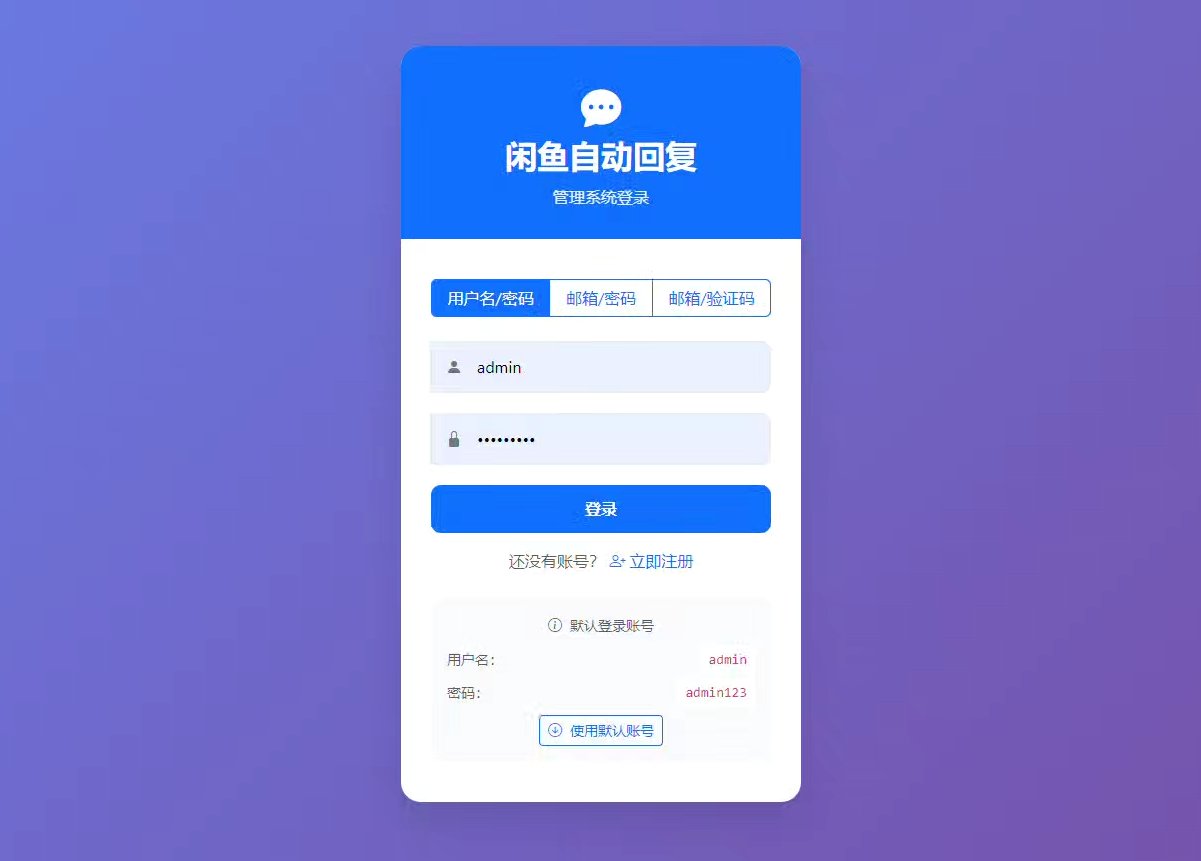
《闲鱼自动发货》程序,源码及python配置分享。 我之前的号上是有一些商品的,所以我想配置一下自动发货,但是我突然想起来,闲鱼最近有个很热门的免费自动发货软件,我想试试看。我就找了一下。先看下环境要求:Python: 3.11+ Node.js: 16+ (用于JavaScript执行) 系统: Windows/Linux/macOS 内存: 建议2GB+存储: 建议10GB+ Docker: 20.10+ (Docker部署) Docker Compose: 2.0+ (Docker部署) 如果你有Docker,或者是 Win10 22H2 或 Win11 23H2 以上,可以安装。 有这个可以一键安装。我就没有,我的是10专业版,下不了,于是用 python 方案来安装的。这个是纯小白方案,不会的也可以一步步的来安装。第一步:去 python.org 下载 Windows 的 Python 3.11.9 安装包(64-bit)安装时勾上: Add python.exe to PATH第二步:在你的源码目录创建虚拟环境(用 3.11.9) 在源码文件夹空白处:Shift + 右键 → “在此处打开 PowerShell”(这个一定要打开,蓝色执行命令界面)然后执行(照抄): py -3.11 -m venv venv.\\venv\\Scripts\\activate 激活后,你命令行前面会出现 (venv)。输入命令: python -V 确认输出是 Python 3.11.x(显示 3.11.9)依次输出命令,回车,等待回传。第三步:安装依赖python -m pip install -U pippip install -r requirements.txt 依次输出命令,回车,等待命令完成。第四步:安装 Playwright 浏览器(项目需要它)执行: playwright install chromium (这一步可能会下载几百 MB,正常。)第五步:启动执行命令: python Start.py 启动后按文档访问: http://localhost:8080 只要步骤没错,基本上,就能启动闲鱼自动发货了。源码下载:隐藏内容,请前往内页查看详情
-
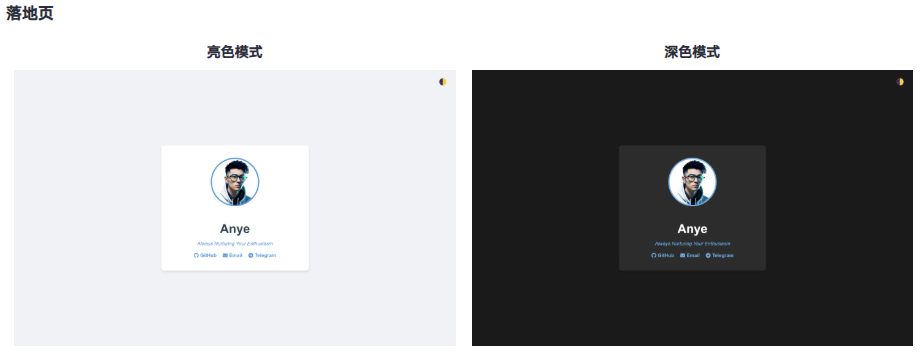
整了几个简洁的单页HTML模板 {collapse}{collapse-item label="查看源码"}<!DOCTYPE html> <html lang="zh-CN"> <head> <meta charset="UTF-8"> <meta name="viewport" content="width=device-width, initial-scale=1.0"> <title>Anye - Always Nurturing Your Enthusiasm</title> <link rel="stylesheet" href="https://cdnjs.cloudflare.com/ajax/libs/font-awesome/6.4.0/css/all.min.css"> <style> :root { --bg-color: #f0f2f5; --text-color: #333; --card-bg: white; --heading-color: #2c3e50; --link-color: #3498db; } .dark-mode { --bg-color: #1a1a1a; --text-color: #e0e0e0; --card-bg: #2c2c2c; --heading-color: #ffffff; --link-color: #63b3ed; } body { font-family: Arial, sans-serif; background-color: var(--bg-color); color: var(--text-color); display: flex; flex-direction: column; justify-content: center; align-items: center; min-height: 100vh; margin: 0; padding: 20px; box-sizing: border-box; transition: background-color 0.3s, color 0.3s; } .container { background-color: var(--card-bg); border-radius: 8px; padding: 40px; box-shadow: 0 4px 6px rgba(0, 0, 0, 0.1); text-align: center; max-width: 400px; width: 100%; transition: background-color 0.3s; } .avatar { width: 150px; height: 150px; border-radius: 50%; margin-bottom: 20px; border: 4px solid var(--link-color); transition: border-color 0.3s; } h1 { color: var(--heading-color); margin-bottom: 10px; font-size: 2.5em; transition: color 0.3s; } .signature { font-style: italic; margin-bottom: 20px; color: var(--link-color); } .contact-links { display: flex; justify-content: center; gap: 20px; margin-top: 20px; } .contact-link { color: var(--link-color); text-decoration: none; font-weight: bold; transition: color 0.3s, transform 0.3s; display: inline-flex; align-items: center; gap: 5px; } .contact-link:hover { transform: scale(1.1); } .theme-toggle { position: absolute; top: 20px; right: 20px; background: none; border: none; color: var(--text-color); cursor: pointer; font-size: 24px; transition: transform 0.3s; } .theme-toggle:hover { transform: scale(1.1); } @media (max-width: 480px) { .container { padding: 20px; } } </style> </head> <body> <button class="theme-toggle" onclick="toggleTheme()" aria-label="切换主题">🌓</button> <div class="container"> <img src="你的logo链接" alt="Logo" class="avatar"> <h1>Name</h1> <p class="signature">个性签名</p> <div class="contact-links"> <a href="https://github.com/" class="contact-link" target="_blank" rel="noopener noreferrer"> <i class="fab fa-github"></i> GitHub </a> <a href="mailto:Youremail" class="contact-link"> <i class="fas fa-envelope"></i> Email </a> <a href="https://t.me/" class="contact-link" target="_blank" rel="noopener noreferrer"> <i class="fab fa-telegram"></i> Telegram </a> </div> </div> <script> function toggleTheme() { document.body.classList.toggle('dark-mode'); localStorage.setItem('theme', document.body.classList.contains('dark-mode') ? 'dark' : 'light'); } const savedTheme = localStorage.getItem('theme'); if (savedTheme === 'dark') { document.body.classList.add('dark-mode'); } const mediaQuery = window.matchMedia('(prefers-color-scheme: dark)'); function handleThemeChange(e) { if (savedTheme) return; if (e.matches) { document.body.classList.add('dark-mode'); } else { document.body.classList.remove('dark-mode'); } } mediaQuery.addListener(handleThemeChange); handleThemeChange(mediaQuery); </script> </body> </html>{/collapse-item}{/collapse}{collapse}{collapse-item label="查看源码"}<!DOCTYPE html> <html lang="zh-CN"> <head> <meta charset="UTF-8"> <meta name="viewport" content="width=device-width, initial-scale=1.0"> <title>404 Not Found</title> <style> :root { --bg-color: #f0f2f5; --text-color: #333; --card-bg: white; --heading-color: #2c3e50; --link-color: #3498db; } .dark-mode { --bg-color: #1a1a1a; --text-color: #e0e0e0; --card-bg: #2c2c2c; --heading-color: #ffffff; --link-color: #63b3ed; } body { font-family: Arial, sans-serif; background-color: var(--bg-color); color: var(--text-color); display: flex; flex-direction: column; justify-content: center; align-items: center; height: 100vh; margin: 0; padding: 20px; box-sizing: border-box; transition: background-color 0.3s, color 0.3s; } .container { background-color: var(--card-bg); border-radius: 8px; padding: 40px; box-shadow: 0 4px 6px rgba(0, 0, 0, 0.1); text-align: center; max-width: 400px; width: 100%; transition: background-color 0.3s; } h1 { color: var(--heading-color); margin-bottom: 20px; font-size: 2.5em; transition: color 0.3s; } p { line-height: 1.6; margin-bottom: 20px; } .icon { font-size: 64px; margin-bottom: 20px; } .back-link { color: var(--link-color); text-decoration: none; font-weight: bold; transition: color 0.3s; } .back-link:hover { text-decoration: underline; } .theme-toggle { position: absolute; top: 20px; right: 20px; background: none; border: none; color: var(--text-color); cursor: pointer; font-size: 24px; transition: transform 0.3s; } .theme-toggle:hover { transform: scale(1.1); } @media (max-width: 480px) { .container { padding: 20px; } } </style> </head> <body> <button class="theme-toggle" onclick="toggleTheme()" aria-label="切换主题">🌓</button> <div class="container"> <div class="icon">🔍</div> <h1>404 Not Found</h1> <p>抱歉,您请求的页面不存在。</p> <p>可能是输入的网址有误,或者该页面已被移动或删除。</p> <a href="/" class="back-link">返回首页</a> </div> <script> function toggleTheme() { document.body.classList.toggle('dark-mode'); localStorage.setItem('theme', document.body.classList.contains('dark-mode') ? 'dark' : 'light'); } const savedTheme = localStorage.getItem('theme'); if (savedTheme === 'dark') { document.body.classList.add('dark-mode'); } const mediaQuery = window.matchMedia('(prefers-color-scheme: dark)'); function handleThemeChange(e) { if (savedTheme) return; if (e.matches) { document.body.classList.add('dark-mode'); } else { document.body.classList.remove('dark-mode'); } } mediaQuery.addListener(handleThemeChange); handleThemeChange(mediaQuery); </script> </body> </html> {/collapse-item}{/collapse}{collapse}{collapse-item label="查看源码"}<!DOCTYPE html> <html lang="zh-CN"> <head> <meta charset="UTF-8"> <meta name="viewport" content="width=device-width, initial-scale=1.0"> <title>404 Not Found</title> <style> :root { --bg-color: #f0f2f5; --text-color: #333; --card-bg: white; --heading-color: #2c3e50; --link-color: #3498db; } .dark-mode { --bg-color: #1a1a1a; --text-color: #e0e0e0; --card-bg: #2c2c2c; --heading-color: #ffffff; --link-color: #63b3ed; } body { font-family: Arial, sans-serif; background-color: var(--bg-color); color: var(--text-color); display: flex; flex-direction: column; justify-content: center; align-items: center; height: 100vh; margin: 0; padding: 20px; box-sizing: border-box; transition: background-color 0.3s, color 0.3s; } .container { background-color: var(--card-bg); border-radius: 8px; padding: 40px; box-shadow: 0 4px 6px rgba(0, 0, 0, 0.1); text-align: center; max-width: 400px; width: 100%; transition: background-color 0.3s; } h1 { color: var(--heading-color); margin-bottom: 20px; font-size: 2.5em; transition: color 0.3s; } p { line-height: 1.6; margin-bottom: 20px; } .icon { font-size: 64px; margin-bottom: 20px; } .back-link { color: var(--link-color); text-decoration: none; font-weight: bold; transition: color 0.3s; } .back-link:hover { text-decoration: underline; } .theme-toggle { position: absolute; top: 20px; right: 20px; background: none; border: none; color: var(--text-color); cursor: pointer; font-size: 24px; transition: transform 0.3s; } .theme-toggle:hover { transform: scale(1.1); } @media (max-width: 480px) { .container { padding: 20px; } } </style> </head> <body> <button class="theme-toggle" onclick="toggleTheme()" aria-label="切换主题">🌓</button> <div class="container"> <div class="icon">🔍</div> <h1>404 Not Found</h1> <p>抱歉,您请求的页面不存在。</p> </div> <script> function toggleTheme() { document.body.classList.toggle('dark-mode'); localStorage.setItem('theme', document.body.classList.contains('dark-mode') ? 'dark' : 'light'); } const savedTheme = localStorage.getItem('theme'); if (savedTheme === 'dark') { document.body.classList.add('dark-mode'); } const mediaQuery = window.matchMedia('(prefers-color-scheme: dark)'); function handleThemeChange(e) { if (savedTheme) return; if (e.matches) { document.body.classList.add('dark-mode'); } else { document.body.classList.remove('dark-mode'); } } mediaQuery.addListener(handleThemeChange); handleThemeChange(mediaQuery); </script> </body> </html> {/collapse-item}{/collapse}{collapse}{collapse-item label="查看源码"}<!DOCTYPE html> <html lang="zh-CN"> <head> <meta charset="utf-8"> <meta name="viewport" content="width=device-width, initial-scale=1.0"> <meta name="robots" content="noindex,nofollow"> <title>恭喜,站点创建成功!</title> <style> :root { --bg-color: #f0f0f0; --text-color: #333; --link-color: #007bff; --container-bg: #ffffff; } .dark-mode { --bg-color: #333; --text-color: #f0f0f0; --link-color: #66b2ff; --container-bg: #1c1c1e; } body { font-family: -apple-system, BlinkMacSystemFont, "Segoe UI", Roboto, Helvetica, Arial, sans-serif; background-color: var(--bg-color); color: var(--text-color); line-height: 1.6; margin: 0; padding: 20px; transition: background-color 0.3s, color 0.3s; } .container { width: 90%; max-width: 600px; margin: 10% auto 0; background-color: var(--container-bg); padding: 30px; border-radius: 10px; box-shadow: 0 4px 6px rgba(0, 0, 0, 0.1); transition: background-color 0.3s; } h1 { color: var(--link-color); margin-top: 0; } ul { padding-left: 20px; } li { margin-bottom: 10px; } a { color: var(--link-color); text-decoration: none; } a:hover { text-decoration: underline; } .theme-toggle { position: fixed; top: 20px; right: 20px; background: none; border: none; color: var(--text-color); font-size: 24px; cursor: pointer; transition: transform 0.3s; } .theme-toggle:hover { transform: scale(1.1); } @media (max-width: 600px) { .container { width: 100%; padding: 20px; } } </style> </head> <body> <button class="theme-toggle" onclick="toggleTheme()" aria-label="切换主题">🌓</button> <div class="container"> <h1>恭喜,站点创建成功!</h1> <h3>这是默认index.html,本页面由系统自动生成</h3> <p>您可以随时修改、删除或替换此页面。以下是一些有用的链接:</p> <ul> <li><a href="https://developer.mozilla.org/zh-CN/docs/Learn/HTML/Introduction_to_HTML" target="_blank" rel="noopener noreferrer">HTML入门教程</a></li> <li><a href="https://developer.mozilla.org/zh-CN/docs/Learn/CSS/First_steps" target="_blank" rel="noopener noreferrer">CSS入门教程</a></li> <li><a href="https://developer.mozilla.org/zh-CN/docs/Learn/JavaScript/First_steps" target="_blank" rel="noopener noreferrer">JavaScript入门教程</a></li> </ul> <p>祝您开发顺利!</p> </div> <script> function toggleTheme() { document.body.classList.toggle('dark-mode'); localStorage.setItem('theme', document.body.classList.contains('dark-mode') ? 'dark' : 'light'); } const savedTheme = localStorage.getItem('theme'); if (savedTheme === 'dark') { document.body.classList.add('dark-mode'); } const mediaQuery = window.matchMedia('(prefers-color-scheme: dark)'); function handleThemeChange(e) { if (savedTheme) return; if (e.matches) { document.body.classList.add('dark-mode'); } else { document.body.classList.remove('dark-mode'); } } mediaQuery.addListener(handleThemeChange); handleThemeChange(mediaQuery); </script> </body> </html> {/collapse-item}{/collapse}{collapse}{collapse-item label="查看源码"}<!DOCTYPE html> <html lang="zh-CN"> <head> <meta charset="UTF-8"> <meta name="viewport" content="width=device-width, initial-scale=1.0"> <title>PHP 信息页面</title> <style> :root { --bg-color: #f0f2f5; --text-color: #333; --card-bg: white; --heading-color: #2c3e50; --link-color: #3498db; } .dark-mode { --bg-color: #1a1a1a; --text-color: #e0e0e0; --card-bg: #2c2c2c; --heading-color: #ffffff; --link-color: #63b3ed; } body { font-family: Arial, sans-serif; background-color: var(--bg-color); color: var(--text-color); line-height: 1.6; margin: 0; padding: 20px; transition: background-color 0.3s, color 0.3s; } .container { max-width: 800px; margin: 0 auto; background-color: var(--card-bg); padding: 20px; border-radius: 8px; box-shadow: 0 4px 6px rgba(0, 0, 0, 0.1); } h1, h2 { color: var(--heading-color); } h1 { text-align: center; margin-bottom: 30px; } ul, ol { padding-left: 20px; } li { margin-bottom: 5px; } .theme-toggle { position: fixed; top: 20px; right: 20px; background: none; border: none; color: var(--text-color); cursor: pointer; font-size: 24px; transition: transform 0.3s; } .theme-toggle:hover { transform: scale(1.1); } @media (max-width: 600px) { body { padding: 10px; } .container { padding: 15px; } } </style> </head> <body> <button class="theme-toggle" onclick="toggleTheme()" aria-label="切换主题">🌓</button> <div class="container"> <h1>欢迎使用 PHP!</h1> <h2>版本信息</h2> <ul> <li>PHP版本:<?php echo PHP_VERSION; ?></li> </ul> <h2>已安装扩展</h2> <ol> <?php foreach (get_loaded_extensions() as $name) { echo "<li>$name = " . phpversion($name) . "</li>"; } ?> </ol> </div> <script> function toggleTheme() { document.body.classList.toggle('dark-mode'); localStorage.setItem('theme', document.body.classList.contains('dark-mode') ? 'dark' : 'light'); } const savedTheme = localStorage.getItem('theme'); if (savedTheme === 'dark') { document.body.classList.add('dark-mode'); } const mediaQuery = window.matchMedia('(prefers-color-scheme: dark)'); function handleThemeChange(e) { if (savedTheme) return; if (e.matches) { document.body.classList.add('dark-mode'); } else { document.body.classList.remove('dark-mode'); } } mediaQuery.addListener(handleThemeChange); handleThemeChange(mediaQuery); </script> </body> </html> {/collapse-item}{/collapse}{collapse}{collapse-item label="查看源码"}<!DOCTYPE html> <html lang="zh-CN"> <head> <meta charset="UTF-8"> <meta name="viewport" content="width=device-width, initial-scale=1.0"> <title>404 Not Found</title> <style> :root { --bg-color: #f0f2f5; --text-color: #333; --card-bg: white; --heading-color: #2c3e50; --link-color: #3498db; --footer-color: #666; } .dark-mode { --bg-color: #1a1a1a; --text-color: #e0e0e0; --card-bg: #2c2c2c; --heading-color: #ffffff; --link-color: #63b3ed; --footer-color: #999; } body { font-family: Arial, sans-serif; background-color: var(--bg-color); color: var(--text-color); display: flex; flex-direction: column; justify-content: center; align-items: center; height: 100vh; margin: 0; padding: 20px; box-sizing: border-box; transition: background-color 0.3s, color 0.3s; } .container { background-color: var(--card-bg); border-radius: 8px; padding: 40px; box-shadow: 0 4px 6px rgba(0, 0, 0, 0.1); text-align: center; max-width: 500px; width: 100%; margin-bottom: 20px; transition: background-color 0.3s; } h1 { color: var(--heading-color); margin-bottom: 20px; transition: color 0.3s; } p { line-height: 1.6; margin-bottom: 20px; } .icon { font-size: 64px; margin-bottom: 20px; } .footer { text-align: center; font-size: 12px; color: var(--footer-color); margin-top: 20px; transition: color 0.3s; } .footer a { color: var(--footer-color); text-decoration: none; transition: color 0.3s; } .footer a:hover { text-decoration: underline; } .theme-toggle { position: absolute; top: 20px; right: 20px; background: none; border: none; color: var(--text-color); cursor: pointer; font-size: 24px; transition: transform 0.3s; } .theme-toggle:hover { transform: scale(1.1); } @media (max-width: 480px) { .container { padding: 20px; } } </style> </head> <body> <button class="theme-toggle" onclick="toggleTheme()" aria-label="切换主题">🌓</button> <div class="container"> <div class="icon">🛠️</div> <h1>网站维护中</h1> <p>非常抱歉,我们的网站正在进行例行维护。我们正在努力改进,以便为您提供更好的服务。</p> <p>预计恢复时间:<strong>未知</strong></p> <p>感谢您的耐心等待和理解。</p> </div> <footer class="footer"> <a href="https://beian.miit.gov.cn/" target="_blank" rel="noopener noreferrer">ICP备案号</a> | <a href="http://www.beian.gov.cn/portal/registerSystemInfo" target="_blank" rel="noopener noreferrer">公安备案号</a> </footer> <script> function toggleTheme() { document.body.classList.toggle('dark-mode'); localStorage.setItem('theme', document.body.classList.contains('dark-mode') ? 'dark' : 'light'); } const savedTheme = localStorage.getItem('theme'); if (savedTheme === 'dark') { document.body.classList.add('dark-mode'); } const mediaQuery = window.matchMedia('(prefers-color-scheme: dark)'); function handleThemeChange(e) { if (savedTheme) return; if (e.matches) { document.body.classList.add('dark-mode'); } else { document.body.classList.remove('dark-mode'); } } mediaQuery.addListener(handleThemeChange); handleThemeChange(mediaQuery); </script> </body> </html> {/collapse-item}{/collapse}{collapse}{collapse-item label="查看源码"}<!DOCTYPE html> <html lang="zh-CN"> <head> <meta charset="UTF-8"> <meta name="viewport" content="width=device-width, initial-scale=1.0"> <title>请求拦截</title> <style> :root { --bg-color: #f0f2f5; --text-color: #333; --card-bg: white; --heading-color: #e74c3c; --link-color: #3498db; } .dark-mode { --bg-color: #1a1a1a; --text-color: #e0e0e0; --card-bg: #2c2c2c; --heading-color: #e74c3c; --link-color: #63b3ed; } body { font-family: Arial, sans-serif; background-color: var(--bg-color); color: var(--text-color); display: flex; flex-direction: column; justify-content: center; align-items: center; height: 100vh; margin: 0; padding: 20px; box-sizing: border-box; transition: background-color 0.3s, color 0.3s; } .container { background-color: var(--card-bg); border-radius: 8px; padding: 40px; box-shadow: 0 4px 6px rgba(0, 0, 0, 0.1); text-align: center; max-width: 400px; width: 100%; transition: background-color 0.3s; } h1 { color: var(--heading-color); margin-bottom: 20px; font-size: 2.5em; transition: color 0.3s; } p { line-height: 1.6; margin-bottom: 20px; } .icon { font-size: 64px; margin-bottom: 20px; } .back-link { color: var(--link-color); text-decoration: none; font-weight: bold; transition: color 0.3s; } .back-link:hover { text-decoration: underline; } .theme-toggle { position: absolute; top: 20px; right: 20px; background: none; border: none; color: var(--text-color); cursor: pointer; font-size: 24px; transition: transform 0.3s; } .theme-toggle:hover { transform: scale(1.1); } @media (max-width: 480px) { .container { padding: 20px; } } </style> </head> <body> <button class="theme-toggle" onclick="toggleTheme()" aria-label="切换主题">🌓</button> <div class="container"> <div class="icon">🛑</div> <h1>请求拦截</h1> <p>请求携带恶意参数 已被拦截</p> <p>为了保护系统安全,您的请求已被系统拦截。</p> <a href="/" class="back-link">返回首页</a> </div> <script> function toggleTheme() { document.body.classList.toggle('dark-mode'); localStorage.setItem('theme', document.body.classList.contains('dark-mode') ? 'dark' : 'light'); } const savedTheme = localStorage.getItem('theme'); if (savedTheme === 'dark') { document.body.classList.add('dark-mode'); } const mediaQuery = window.matchMedia('(prefers-color-scheme: dark)'); function handleThemeChange(e) { if (savedTheme) return; if (e.matches) { document.body.classList.add('dark-mode'); } else { document.body.classList.remove('dark-mode'); } } mediaQuery.addListener(handleThemeChange); handleThemeChange(mediaQuery); </script> </body> </html> {/collapse-item}{/collapse}{collapse}{collapse-item label="查看源码"}<!DOCTYPE html> <html lang="zh-CN"> <head> <meta charset="UTF-8"> <meta name="viewport" content="width=device-width, initial-scale=1.0"> <title>网站不存在</title> <style> :root { --bg-color: #f0f2f5; --text-color: #333; --card-bg: white; --heading-color: #2c3e50; --link-color: #3498db; } .dark-mode { --bg-color: #1a1a1a; --text-color: #e0e0e0; --card-bg: #2c2c2c; --heading-color: #ffffff; --link-color: #63b3ed; } body { font-family: Arial, sans-serif; background-color: var(--bg-color); color: var(--text-color); display: flex; flex-direction: column; justify-content: center; align-items: center; height: 100vh; margin: 0; padding: 20px; box-sizing: border-box; transition: background-color 0.3s, color 0.3s; } .container { background-color: var(--card-bg); border-radius: 8px; padding: 40px; box-shadow: 0 4px 6px rgba(0, 0, 0, 0.1); text-align: center; max-width: 400px; width: 100%; transition: background-color 0.3s; } h1 { color: var(--heading-color); margin-bottom: 20px; font-size: 2.5em; transition: color 0.3s; } p { line-height: 1.6; margin-bottom: 20px; } .icon { font-size: 64px; margin-bottom: 20px; } .back-link { color: var(--link-color); text-decoration: none; font-weight: bold; transition: color 0.3s; } .back-link:hover { text-decoration: underline; } .theme-toggle { position: absolute; top: 20px; right: 20px; background: none; border: none; color: var(--text-color); cursor: pointer; font-size: 24px; transition: transform 0.3s; } .theme-toggle:hover { transform: scale(1.1); } @media (max-width: 480px) { .container { padding: 20px; } } </style> </head> <body> <button class="theme-toggle" onclick="toggleTheme()" aria-label="切换主题">🌓</button> <div class="container"> <div class="icon">🌐</div> <h1>网站不存在</h1> <p>网站不存在,请检查域名</p> <a href="javascript:history.back()" class="back-link">返回上一页</a> </div> <script> function toggleTheme() { document.body.classList.toggle('dark-mode'); localStorage.setItem('theme', document.body.classList.contains('dark-mode') ? 'dark' : 'light'); } const savedTheme = localStorage.getItem('theme'); if (savedTheme === 'dark') { document.body.classList.add('dark-mode'); } const mediaQuery = window.matchMedia('(prefers-color-scheme: dark)'); function handleThemeChange(e) { if (savedTheme) return; if (e.matches) { document.body.classList.add('dark-mode'); } else { document.body.classList.remove('dark-mode'); } } mediaQuery.addListener(handleThemeChange); handleThemeChange(mediaQuery); </script> </body> </html> {/collapse-item}{/collapse}{collapse}{collapse-item label="查看源码"}<!DOCTYPE html> <html lang="en"> <head> <meta charset="UTF-8"> <meta name="viewport" content="width=device-width, initial-scale=1.0"> <title>Access Denied</title> <style> :root { --bg-color: #f0f2f5; --text-color: #333; --card-bg: white; --heading-color: #2c3e50; --link-color: #3498db; } .dark-mode { --bg-color: #1a1a1a; --text-color: #e0e0e0; --card-bg: #2c2c2c; --heading-color: #ffffff; --link-color: #63b3ed; } body { font-family: Arial, sans-serif; background-color: var(--bg-color); color: var(--text-color); display: flex; flex-direction: column; justify-content: center; align-items: center; height: 100vh; margin: 0; padding: 20px; box-sizing: border-box; transition: background-color 0.3s, color 0.3s; } .container { background-color: var(--card-bg); border-radius: 8px; padding: 40px; box-shadow: 0 4px 6px rgba(0, 0, 0, 0.1); text-align: center; max-width: 400px; width: 100%; transition: background-color 0.3s; } h1 { color: var(--heading-color); margin-bottom: 20px; font-size: 2.5em; transition: color 0.3s; } p { line-height: 1.6; margin-bottom: 20px; } .icon { font-size: 64px; margin-bottom: 20px; } .theme-toggle { position: absolute; top: 20px; right: 20px; background: none; border: none; color: var(--text-color); cursor: pointer; font-size: 24px; transition: transform 0.3s; } .theme-toggle:hover { transform: scale(1.1); } .language-toggle { position: absolute; top: 20px; left: 20px; background: none; border: none; color: var(--text-color); cursor: pointer; font-size: 24px; transition: transform 0.3s; } .language-toggle:hover { transform: scale(1.1); } @media (max-width: 480px) { .container { padding: 20px; } } </style> </head> <body> <button class="theme-toggle" onclick="toggleTheme()" aria-label="Toggle theme">🌓</button> <button class="language-toggle" onclick="toggleLanguage()" aria-label="Toggle language">🌐</button> <div class="container" role="main"> <div class="icon" aria-hidden="true">🚫</div> <h1 id="title">Access Denied</h1> <p id="message">Your region is blocked from accessing this content.</p> </div> <script> const translations = { en: { title: "Access Denied", message: "Your region is blocked from accessing this content.", themeLabel: "Toggle theme", langLabel: "Toggle language" }, zh: { title: "地区拦截", message: "你的区域被禁止访问", themeLabel: "切换主题", langLabel: "切换语言" } }; let currentLang = navigator.language.startsWith('zh') ? 'zh' : 'en'; function updateContent() { document.getElementById('title').textContent = translations[currentLang].title; document.getElementById('message').textContent = translations[currentLang].message; document.querySelector('.theme-toggle').setAttribute('aria-label', translations[currentLang].themeLabel); document.querySelector('.language-toggle').setAttribute('aria-label', translations[currentLang].langLabel); document.documentElement.lang = currentLang; } function toggleLanguage() { currentLang = currentLang === 'en' ? 'zh' : 'en'; updateContent(); } function toggleTheme() { document.body.classList.toggle('dark-mode'); localStorage.setItem('theme', document.body.classList.contains('dark-mode') ? 'dark' : 'light'); } const savedTheme = localStorage.getItem('theme'); if (savedTheme === 'dark') { document.body.classList.add('dark-mode'); } const mediaQuery = window.matchMedia('(prefers-color-scheme: dark)'); function handleThemeChange(e) { if (savedTheme) return; if (e.matches) { document.body.classList.add('dark-mode'); } else { document.body.classList.remove('dark-mode'); } } mediaQuery.addListener(handleThemeChange); handleThemeChange(mediaQuery); updateContent(); </script> </body> </html> {/collapse-item}{/collapse}{collapse}{collapse-item label="查看源码"}<!DOCTYPE html> <html lang="zh-CN"> <head> <meta charset="UTF-8"> <meta name="viewport" content="width=device-width, initial-scale=1.0"> <title>IP 黑名单拦截</title> <style> :root { --bg-color: #f0f2f5; --text-color: #333; --card-bg: white; --heading-color: #2c3e50; --link-color: #3498db; } .dark-mode { --bg-color: #1a1a1a; --text-color: #e0e0e0; --card-bg: #2c2c2c; --heading-color: #ffffff; --link-color: #63b3ed; } body { font-family: Arial, sans-serif; background-color: var(--bg-color); color: var(--text-color); display: flex; flex-direction: column; justify-content: center; align-items: center; height: 100vh; margin: 0; padding: 20px; box-sizing: border-box; transition: background-color 0.3s, color 0.3s; } .container { background-color: var(--card-bg); border-radius: 8px; padding: 40px; box-shadow: 0 4px 6px rgba(0, 0, 0, 0.1); text-align: center; max-width: 400px; width: 100%; transition: background-color 0.3s; } h1 { color: var(--heading-color); margin-bottom: 20px; font-size: 2em; transition: color 0.3s; } p { line-height: 1.6; margin-bottom: 20px; } .icon { font-size: 64px; margin-bottom: 20px; } .contact-link { color: var(--link-color); text-decoration: none; font-weight: bold; transition: color 0.3s; } .contact-link:hover { text-decoration: underline; } .theme-toggle { position: absolute; top: 20px; right: 20px; background: none; border: none; color: var(--text-color); cursor: pointer; font-size: 24px; transition: transform 0.3s; } .theme-toggle:hover { transform: scale(1.1); } @media (max-width: 480px) { .container { padding: 20px; } } </style> </head> <body> <button class="theme-toggle" onclick="toggleTheme()" aria-label="切换主题">🌓</button> <main class="container"> <div class="icon" aria-hidden="true">🚫</div> <h1>黑名单拦截</h1> <p>很抱歉,您的 IP 被禁止访问</p> <p>如果您认为这是一个错误,请联系我们的支持团队。</p> <a href="mailto:youremail" class="contact-link">联系支持</a> </main> <script> function toggleTheme() { document.body.classList.toggle('dark-mode'); localStorage.setItem('theme', document.body.classList.contains('dark-mode') ? 'dark' : 'light'); } const savedTheme = localStorage.getItem('theme'); if (savedTheme === 'dark') { document.body.classList.add('dark-mode'); } const mediaQuery = window.matchMedia('(prefers-color-scheme: dark)'); function handleThemeChange(e) { if (savedTheme) return; if (e.matches) { document.body.classList.add('dark-mode'); } else { document.body.classList.remove('dark-mode'); } } mediaQuery.addListener(handleThemeChange); handleThemeChange(mediaQuery); </script> </body> </html> {/collapse-item}{/collapse}{collapse}{collapse-item label="查看源码"}<!DOCTYPE html> <html lang="zh-CN"> <head> <meta charset="UTF-8"> <meta name="viewport" content="width=device-width, initial-scale=1.0"> <title>停止服务</title> <style> :root { --bg-color: #f0f2f5; --text-color: #333; --card-bg: white; --heading-color: #2c3e50; --link-color: #3498db; --footer-color: #666; } .dark-mode { --bg-color: #1a1a1a; --text-color: #e0e0e0; --card-bg: #2c2c2c; --heading-color: #ffffff; --link-color: #63b3ed; --footer-color: #999; } body { font-family: Arial, sans-serif; background-color: var(--bg-color); color: var(--text-color); display: flex; flex-direction: column; justify-content: center; align-items: center; height: 100vh; margin: 0; padding: 20px; box-sizing: border-box; transition: background-color 0.3s, color 0.3s; } .container { background-color: var(--card-bg); border-radius: 8px; padding: 40px; box-shadow: 0 4px 6px rgba(0, 0, 0, 0.1); text-align: center; max-width: 500px; width: 100%; margin-bottom: 20px; transition: background-color 0.3s; } h1 { color: var(--heading-color); margin-bottom: 20px; transition: color 0.3s; } p { line-height: 1.6; margin-bottom: 20px; } .icon { font-size: 64px; margin-bottom: 20px; } .footer { text-align: center; font-size: 12px; color: var(--footer-color); margin-top: 20px; transition: color 0.3s; } .footer a { color: var(--footer-color); text-decoration: none; transition: color 0.3s; } .footer a:hover { text-decoration: underline; } .theme-toggle { position: absolute; top: 20px; right: 20px; background: none; border: none; color: var(--text-color); cursor: pointer; font-size: 24px; transition: transform 0.3s; } .theme-toggle:hover { transform: scale(1.1); } @media (max-width: 480px) { .container { padding: 20px; } } </style> </head> <body> <button class="theme-toggle" onclick="toggleTheme()" aria-label="切换主题">🌓</button> <div class="container"> <div class="icon">🚧</div> <h1>停止服务</h1> <p>非常抱歉,由于XXX,本服务即日起停止运营。</p> </div> <footer class="footer"> <a href="https://beian.miit.gov.cn/" target="_blank" rel="noopener noreferrer">ICP备案号</a> | <a href="http://www.beian.gov.cn/portal/registerSystemInfo" target="_blank" rel="noopener noreferrer">公网安备号</a> </footer> <script> function toggleTheme() { document.body.classList.toggle('dark-mode'); localStorage.setItem('theme', document.body.classList.contains('dark-mode') ? 'dark' : 'light'); } const savedTheme = localStorage.getItem('theme'); if (savedTheme === 'dark') { document.body.classList.add('dark-mode'); } const mediaQuery = window.matchMedia('(prefers-color-scheme: dark)'); function handleThemeChange(e) { if (savedTheme) return; if (e.matches) { document.body.classList.add('dark-mode'); } else { document.body.classList.remove('dark-mode'); } } mediaQuery.addListener(handleThemeChange); handleThemeChange(mediaQuery); </script> </body> </html> {/collapse-item}{/collapse}Halo Pro “金色传说”{collapse}{collapse-item label="查看源码"}<script> /* Halo Pro */ document.addEventListener('DOMContentLoaded', function () { const generatorContent = document.querySelector('meta[name="generator"]').getAttribute('content').replace("Halo ", "Halo Pro "); const link = document.querySelector('footer a[href="https://halo.run"]'); link.textContent = generatorContent; }); </script> <style> /* 页脚的链接文本动画效果 */ @keyframes maskedAnimation { 0% { background-position: 0 0; } 100% { background-position: -100% 0; } } footer a[href="https://halo.run"] { font-weight: bold; background-image: -webkit-linear-gradient(left, #ffdd00, #3e2f08 25%, #ffdd00 50%, #3e2f08 75%, #ffdd00); -webkit-text-fill-color: transparent; -webkit-background-clip: text; -webkit-background-size: 200% 100%; -webkit-animation: maskedAnimation 1s infinite linear; } </style> {/collapse-item}{/collapse}本站公告弹窗{collapse}{collapse-item label="查看源码"}<script> /* 站点弹窗公告 */ document.addEventListener('DOMContentLoaded', function() { if (document.cookie.indexOf('modalManuallyClosed=true') !== -1) { return; } var modal = document.createElement('div'); var isDarkMode = document.documentElement.classList.contains('dark'); modal.style.cssText = ` position: fixed; top: 20px; right: -350px; width: 300px; background-color: ${isDarkMode ? 'rgba(30, 41, 59, 0.9)' : 'rgba(255, 255, 255, 0.9)'}; backdrop-filter: blur(5px); padding: 20px; border-radius: 15px; box-shadow: 0 4px 20px rgba(0,0,0,0.15); z-index: 1000; transition: right 0.3s ease-in-out, background-color 0.3s ease; font-family: Arial, sans-serif; font-size: 16px; line-height: 1.5; color: ${isDarkMode ? '#e2e8f0' : 'inherit'}; `; var content = document.createElement('div'); content.innerHTML = ` <strong style="font-size: 18px; display: block; margin-bottom: 10px; padding-right: 20px;">公告</strong> <p style="margin: 0; padding-right: 20px;"> 站点公告内容 </p> `; modal.appendChild(content); var closeButton = document.createElement('span'); closeButton.textContent = '×'; closeButton.style.cssText = ` position: absolute; top: 10px; right: 15px; font-size: 24px; color: ${isDarkMode ? '#9ca3af' : '#999'}; cursor: pointer; width: 30px; height: 30px; line-height: 30px; text-align: center; background-color: transparent; border-radius: 50%; transition: background-color 0.2s, color 0.2s; `; closeButton.onmouseover = function() { this.style.backgroundColor = isDarkMode ? '#4b5563' : '#f0f0f0'; this.style.color = isDarkMode ? '#e2e8f0' : '#333'; }; closeButton.onmouseout = function() { this.style.backgroundColor = 'transparent'; this.style.color = isDarkMode ? '#9ca3af' : '#999'; }; function closeModal(isManual) { modal.style.right = '-350px'; setTimeout(function() { document.body.removeChild(modal); }, 300); if (isManual) { // 设置 cookie,有效期为 30 天 var date = new Date(); date.setTime(date.getTime() + (30 * 24 * 60 * 60 * 1000)); document.cookie = "modalManuallyClosed=true; expires=" + date.toUTCString() + "; path=/"; } } closeButton.onclick = function() { clearAutoCloseTimer(); closeModal(true); // 传入 true 表示手动关闭 }; modal.appendChild(closeButton); document.body.appendChild(modal); setTimeout(function() { modal.style.right = '20px'; }, 50); var autoCloseTimer; var timeoutExpired = false; function startAutoCloseTimer() { autoCloseTimer = setTimeout(function() { timeoutExpired = true; if (!modal.matches(':hover')) { closeModal(false); // 传入 false 表示自动关闭 } }, 4000); } function clearAutoCloseTimer() { clearTimeout(autoCloseTimer); } startAutoCloseTimer(); modal.onmouseenter = function() { clearAutoCloseTimer(); }; modal.onmouseleave = function() { if (timeoutExpired) { closeModal(false); // 传入 false 表示自动关闭 } else { startAutoCloseTimer(); } }; }); </script>{/collapse-item}{/collapse}
-